Implementing two-factor authentication (2FA) has become a cornerstone of modern digital security, providing an additional layer of protection beyond traditional username and password combinations. At its core, 2FA strengthens account security by requiring users to present two distinct forms of verification: something they know, such as a password or PIN, and something they have, like a smartphone, hardware token, or authenticator app. This dual requirement dramatically reduces the likelihood of unauthorized access because compromising both factors simultaneously is significantly more difficult for attackers.
The flow of two-factor authentication typically begins at the point of login. When a user enters their username and password, the system first validates the credentials against its stored authentication data. If the password matches, the system proceeds to the second step: verifying the additional authentication factor. This second factor can take several forms. One of the most common methods is the Time-Based One-Time Password (TOTP), delivered through an authenticator app such as Google Authenticator or Authy. These apps generate codes that refresh every 30 seconds, ensuring that the verification token is both unique and ephemeral.
Another popular form of 2FA is Short Message Service (SMS)-based verification. In this scenario, after entering the correct password, the system sends a numeric code via text message to the user’s registered phone number. The user must then input this code to complete the login process. Although SMS verification provides convenience, it is generally considered less secure than app-based authentication due to vulnerabilities such as SIM swapping and interception of text messages. Nevertheless, SMS remains widely used due to its simplicity and low barrier to adoption.
Push notifications represent a modern approach to the second factor. In this method, after a password is entered, the user receives a push notification on a registered device prompting them to approve or deny the login attempt. This approach not only simplifies the user experience by removing the need to manually enter codes, but it also enables contextual decision-making. Users can review the login attempt’s location and device before approving, adding an additional layer of security awareness.
Hardware tokens, such as Universal 2nd Factor (U2F) keys, provide yet another option. These physical devices, often in the form of USB or NFC-enabled keys, interact directly with the system to confirm identity. They are particularly effective in defending against phishing attacks, as they cannot be replicated or intercepted remotely. When a user inserts the hardware token and taps it, the device generates a cryptographic signature that verifies the user’s identity without transmitting reusable codes over potentially insecure channels.
The 2FA flow also includes contingency mechanisms for users who lose access to their secondary authentication method. Backup codes are one common solution. These are typically a set of single-use alphanumeric codes generated by the system when the user first sets up 2FA. Users are advised to store these codes securely in a location separate from their primary devices. In addition, some platforms allow for the registration of multiple devices or phone numbers, providing alternate routes for authentication.
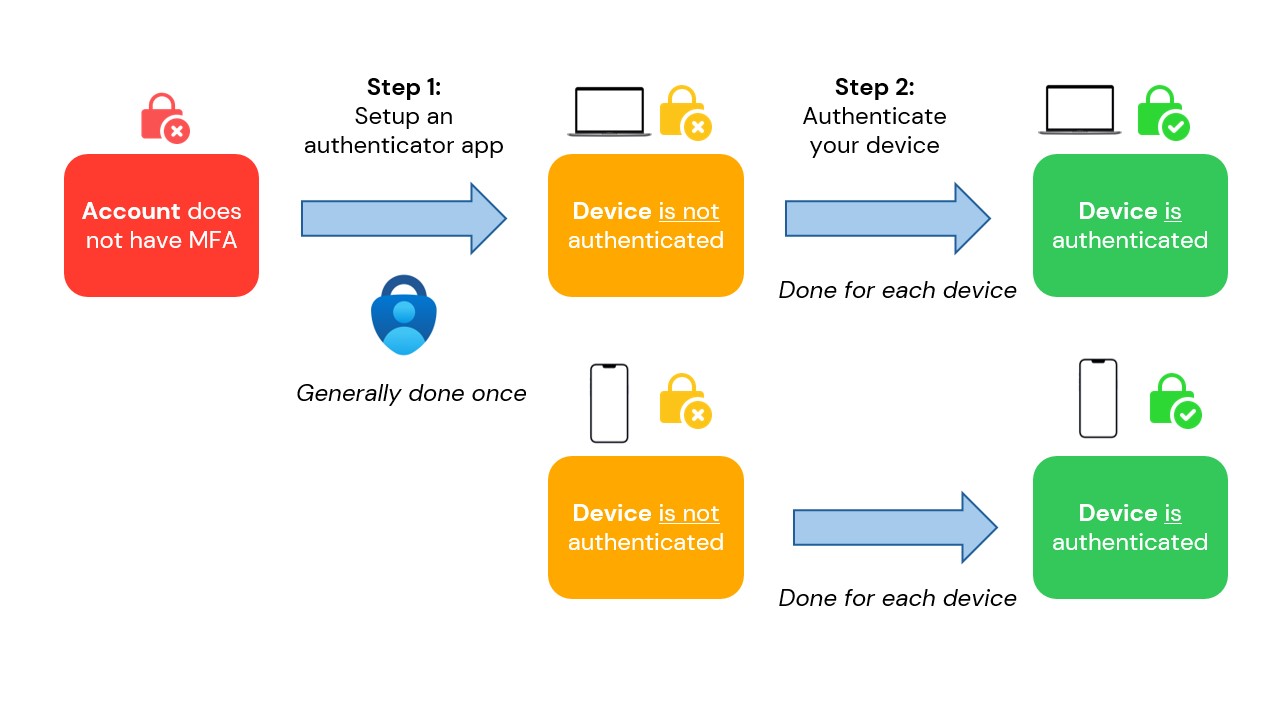
Setting up 2FA generally begins with the user opting into the feature through account settings. The platform will guide the user through registering their chosen second factor, often providing a QR code for app-based methods or instructions for linking hardware tokens. Once the second factor is configured, the system may require verification by requesting the initial code from the user, ensuring that the factor has been properly linked to the account.
User experience design plays a critical role in the success of 2FA adoption. If the flow is cumbersome or unintuitive, users may be discouraged from enabling it, leaving accounts more vulnerable. Clear instructions, immediate feedback on incorrect entries, and seamless integration into the login sequence help maintain security without causing frustration. Systems may also provide options for “remembered devices,” allowing users to bypass the second factor on trusted devices while maintaining protection on new or unrecognized devices.
Security monitoring and alerting are complementary elements of the 2FA flow. When a second-factor challenge is triggered, the system may log the attempt and notify the user, especially if the attempt occurs from a new device or location. This proactive communication allows users to respond quickly to potential unauthorized access, such as by changing passwords or reporting suspicious activity.
While 2FA significantly enhances security, it is not infallible. Users must remain vigilant against phishing schemes designed to capture both factors, social engineering attacks that exploit human trust, and malware that intercepts codes or notifications. Platforms can mitigate these risks by implementing adaptive authentication measures, such as risk-based prompts that require additional verification only under unusual circumstances.
Continuous improvement in the flow of 2FA is essential as threat landscapes evolve. Developers and security teams often analyze login attempts, success rates, and user feedback to refine the authentication process. Innovations such as biometric integration, device fingerprinting, and decentralized authentication models are increasingly incorporated to provide both stronger security and more intuitive experiences.
Ultimately, the two-factor authentication flow is a balance between robust security and usability. By carefully designing the steps of verification, providing multiple second-factor options, and supporting contingency measures, platforms can empower users to protect their accounts effectively. As digital interactions continue to expand across devices and services, 2FA remains a fundamental component of safeguarding sensitive information and maintaining trust in digital ecosystems.



Be First to Comment